Passage of Time
📋 TLDR: 3D Astronomy Visualization
- 🌌 Interactive 3D Simulation: Earth, Moon, and Sun orbital mechanics in real-time
- 🌀 Helical Orbits: Visualize complex 3D motion of celestial bodies over time
- 🎮 Full Controls: Play/pause, speed adjustment, time scrubbing, reset functionality
- 🖥️ Web-Based: No installation required, runs in any modern browser
- 🎓 Educational: Perfect for astronomy enthusiasts and science education
Key Technologies:
- 🎨 Three.js for 3D rendering
- 🌟 Interactive orbital mechanics
- 📱 Mobile-responsive design
- ♿ Accessibility features
🌌 Passage of Time 时光流转
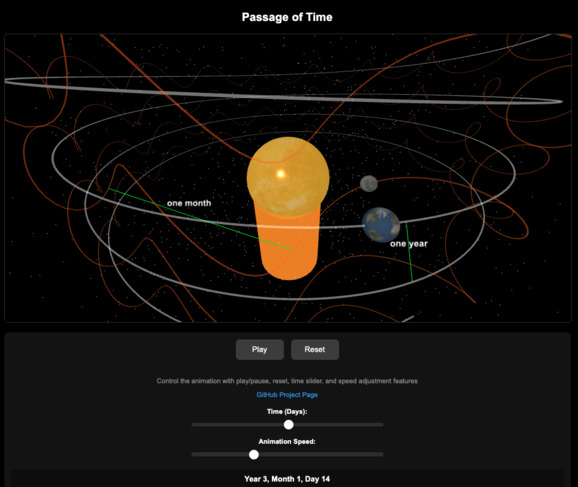
This interactive web application visualizes the orbital paths of the Earth and Moon around the Sun in a 3D environment, simulating their helical motion over time. It uses Three.js for 3D rendering.
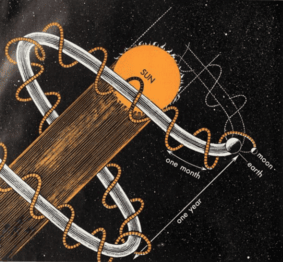 Inspired by https://archive.org/details/yousciencescienc00bran/page/172/mode/1up
🌟 Overview
- ☀️ The Sun (yellow) at the center.
- 🌍 The Earth (blue) orbiting the Sun in an elliptical path, completing one orbit in 360 days (for simplification purposes).
- 🌙 The Moon (gray) orbiting the Earth, completing one orbit in 30 days (for simplification purposes).
- 🔘 Gray orbit lines for the Earth’s path, and 🟠 Orange orbit lines for the Moon’s path, simulating a helical motion in 3D space.
- 🎛️ Users can control the animation with play/pause, reset, time slider, and speed adjustment features.
🎯 Features
- 🖼️ 3D Visualization: Uses Three.js to render a 3D scene with helical orbits.
- 🎮 Interactive Controls: Play/pause, reset, time slider (days), and speed adjustment.
- ✨ Starry Background: A simple starry effect to enhance the space theme.
- ♿ Accessibility: Includes ARIA labels and keyboard controls for better usability.
- 📱 Design: Optimized for both desktop and mobile devices.
🛠️ Installation
To run this project locally, follow these steps:
📥 Clone the Repository
- If you have a GitHub repository for this project, clone it:
git clone <repository-url>
cd passage-of-time
If not, create a new folder and download the files manually.
🌐 Set Up a Local Web Server
Since this project relies on JavaScript and CDNs, you need to serve it via a web server (not directly from file://):
- Using Python (recommended for quick setup):
python -m http.server 8000- Then open your browser and navigate to http://localhost:8000.
- Using VS Code Live Server Extension: Install the Live Server extension, right-click index.html, and select “Open with Live Server.”
Alternative:
- Use any local web server (e.g., Node.js with http-server).
- Ensure Internet Connection
The project uses CDN-hosted Three.js and OrbitControls libraries, so an active internet connection is required for the initial load.
🚀 Usage
- Open index.html in a web browser via a local web server.
- Use the controls at the bottom to interact with the animation:
- ▶️ Play/Pause Button: Start or stop the animation (also toggle with the spacebar).
- 🔄 Reset Button: Reset the animation to Day 0 (also use the ‘r’ key).
- ⏰ Time Slider (Days): Adjust the current day (0–360) to view specific positions.
- ⚡ Speed Slider: Adjust the animation speed (0.1x to 2x).
- The starry background and celestial bodies (Sun, Earth, Moon) should be visible, with gray orbit lines showing their paths.
- Click “Play” to see the animation of helical orbits.
📋 Prerequisites
- 🌐 A modern web browser (e.g., Chrome, Firefox, Edge, versions from 2023 or later) with WebGL enabled.
- 📶 An internet connection to load Three.js and OrbitControls from CDNs.
⚠️ Known Issues
- If you see errors like THREE is not defined, ensure your internet connection is active and the CDN URLs in index.html are accessible.
- Consider using local copies of three.min.js and OrbitControls.min.js if CDNs fail (see comments in index.html for fallback instructions).
- Orbit controls may not work if the OrbitControls.min.js script fails to load. Temporarily, the project operates without orbit controls until visibility is confirmed.
🤝 Contributing
- Contributions are welcome!
🙏 Acknowledgements
- Built using Three.js for 3D rendering.
- Images from SolarSystemScope
- Inspired by a retro-style image of Earth, Moon, and Sun orbits, from a 1960’s science textbook illustration
🔗 Inspiration Videos
YouTube Video - Orbital Mechanics Visualization:
Bilibili Video - Space and Time Visualization:
https://www.bilibili.tv/en/video/4788698128587264?bstar_from=bstar-web.homepage.recommend.all
📄 License
- Distributed under the GNU Affero General Public License v3.0 License. See
LICENSEfor more information.